
Not chaos exactly but since previous posts have opened with this title it seems to make sense to follow the pattern with this post. Note to self: I should soon put a list of these posts together to easily locate them for myself although a tag search for ‘chaos’ or ‘productivity’ usually produces the posts I’m looking for. Perhaps the title ‘Organising the chaos…’ will develop into a series since I plan to write about my experiences with Nvivo, EndNote and possibly even Notion (no, I haven’t mentioned it before now simply beause I hadn’t heard of it until last week when one of my tribe at CTEL Lancaster brought it to my attention – watch this space as they say).
After yet another Microsoft Word crash during my first module at Lancaster in early 2019 I decided to buy a Scrivener licence having played with the 30 days trial over a number of months – it’s really cool of Literature and Latte to offer this trial in terms of actual days rather than consecutive days. Since then I’ve used it for all my PhD projects and it’s been great. Regular backups, no crashes, clear structure and layout, all the things that I struggle with longer documents in Word, especially the scrolling. I avoid scrolling in Scrivener by setting the line spacing to say 1.1 while I’m writing but then change it to double line spacing per APA guidelines (or my preferred 1.5 that no one has yet corrected me on) when I’m getting ready to export (I mean compile) to Word. I know I’m not using Scrivener to its full capacity but I’m learning a little more from people I know who also use it so today my plan is to prepare a revised draft of my current project ready to compile for the draft submission that is due in just over a week. My hope is that by documenting the experience as I go I will have a handy reference guide for myself for my thesis project that starts in January.
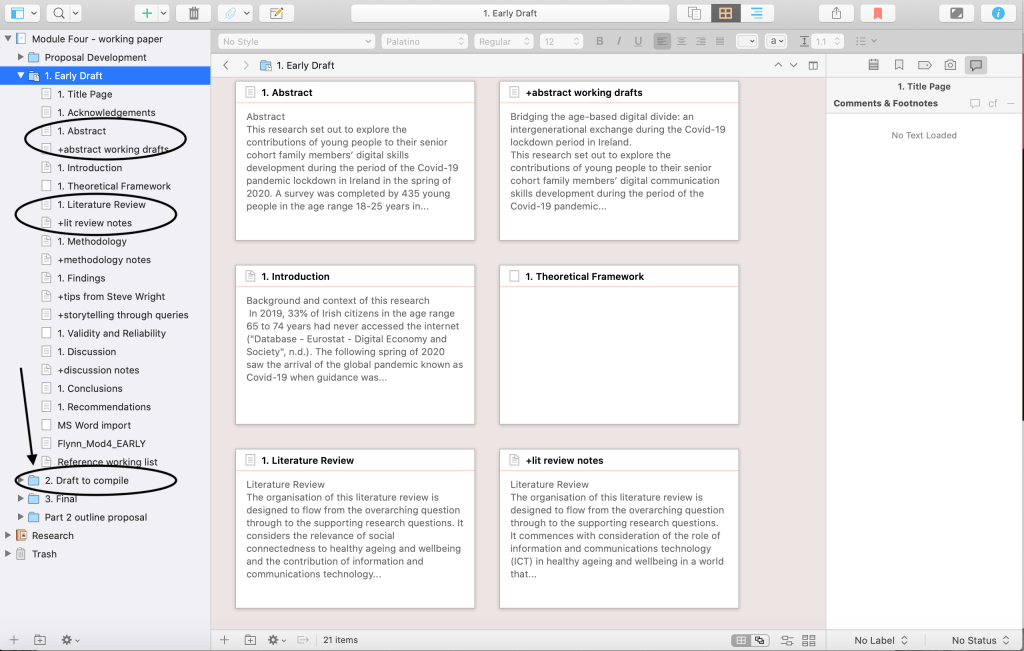
Up to this point I have been working in Scrivener in a relatively structured way and I can easily navigate my way around my project. It doesn’t look pretty (see screenshot below), I have working notes alongside section titles that will be removed in my next draft which I hope to compile to Word.

Until next time, Sandra
P.S. A bit of an afterthought the day after writing this post but thought I should share my two ‘go to’ resources for Scrivener and thesis writing: Elaine Gregerson’s A Law unto Herself blog and Andrea Severson’s video on her JeSuisJusteMoi YouTube channel – check them out.
 Sandra Flynn
Thanks so much for sharing this Sandra … I have wanted to experiment with Scrivener for a while but having had a nightmare with various broken laptop drama to content with I haven’t got around to it and I was a little bit reluctant to install it on the one I have now … I certainly like the idea behind it and your post makes me think I should think about giving it a go again …
I like the fact that it isn’t linear like word .. it is very useful to see your screen shots .. I would be interested to find out your workflow when it comes to citations, do you only do that when you move it across to word ?
I did experiment with Notion a while back and while I think that has real potential it didn’t really give me what I was looking for at the time but I think having read your post that Scrivener is worth considering …
Great idea to do a series of blog posts .. looking forward to reading them …
LikeLike
Hi Debbie, Great to hear from you and I’ve been meaning to write about Scrivener for some time. My use has been getting better with every module but I admit I haven’t cracked a reference list yet so in the past kept this as a separate file in Word 😬 I’ve been keeping working references in Scrivener for this module together with in-text citations so I’ll see if this works in the coming week before the draft is due. I’ve never gotten on well with CiteAsYouWrite type of plugins so slow to go down that route. I also need to clean up Endnote and add pdf attachments since I hope to use Nvivo for lit review next year. All writing will be in Scrivener though 😉
I’ll keep you “posted”🤣 S.
LikeLiked by 1 person