
My PhD Gantt chart for July 2021 has the following activity:
Set up and test tech requirements for telephone interviews.
In my mind I expected this to be quite straightforward. I would make the calls from my phone to the participant’s landline or non-smartphone using Microsoft Teams, the calls would also be recorded using Teams. Then I would upload the audio files to my university’s OneDrive, use Microsoft Word for a first cut at transcription and all would be well.
I often hear peers’ say how good this or that transcription tool is and I wonder to myself if they have ethical approval to use a third party tool. I also wonder why anyone would pay for a service when as students we can get something similar through our university accounts. I digress a little here, just to say that I am practicing what I preach to my own research students when they get ideas about using a third party tool to collect survey data. Why go to the bother? And who knows what might happen the data in whatever cloud it happens to be stored in?
Earlier this week I decided I would tick the afore-mentioned activity off my ‘to do’ list since it seemed quite straightforward. I had a friend lined up to receive my call and who agreed that it could be recorded for the purposes of the test. Well, that’s not quite how it turned out…
I opened Microsoft Teams on my iPhone and tried to locate my friend in the contacts list. No joy, these were all Lancaster U people but this was to be expected. There should be an option to dial my friend’s number. No joy either. In my Lancaster U Microsoft Teams groups there is one called Office 365 User Group and a couple of subgroups to support Teams. So far so good. I chose the subgroup called Teams (meetings and webinars) and posed my question:

A response came pretty quickly from a member of the group that ended with this sentence:

Uh oh. Surely ‘old school’ does not mean manual notetaking… Surely I could find a way of recording not just my side of the telephone interview but the participant’s also? But how??? Not being a teccie sort of person I decided to look at what I have in my Apple toolkit – an iPhone on speaker mode to conduct the interview, a second device, iPhone or iPad placed near the iPhone being used for the interview, and Voice Memos to make the recording. Would this process work? There was only one way to find out and I am happy to report that I was rewarded with an audio .m4a file on the second iPhone. Next priority was to get the audio file off the Apple iCloud and onto OneDrive and pretty easy to do. Next step was to delete the audio file from the iPhone and follow ethical practice.
Moving on to transcription and following advice from Steve in one of his blog posts I decided to give it a go. I highly recommend bookmarking Steve’s blog for all things to do with qualitative data analysis, it’s a mine of valuable information. I notice now that the steps I’m about to document are already in this Microsoft resource, but hey, this post is for me so I will carry on. The screenshots that follow look a bit untidy but capture the steps that I went through to import my audio file into Word and produce an edited transcript.
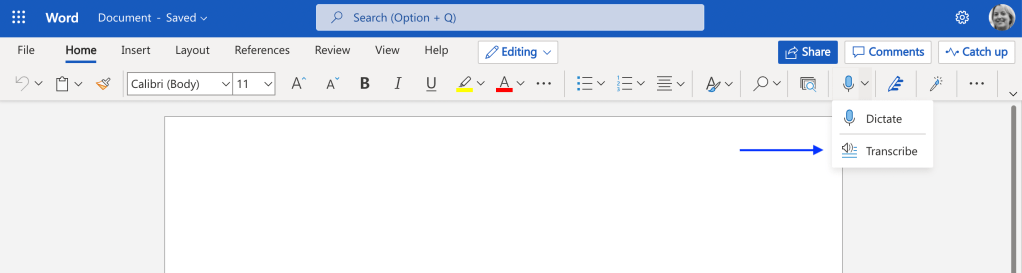


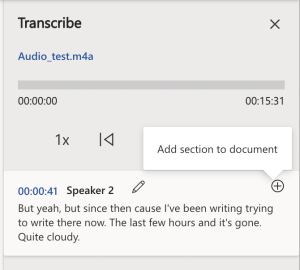
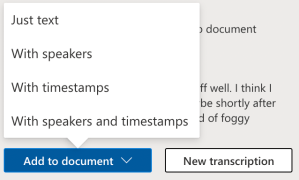
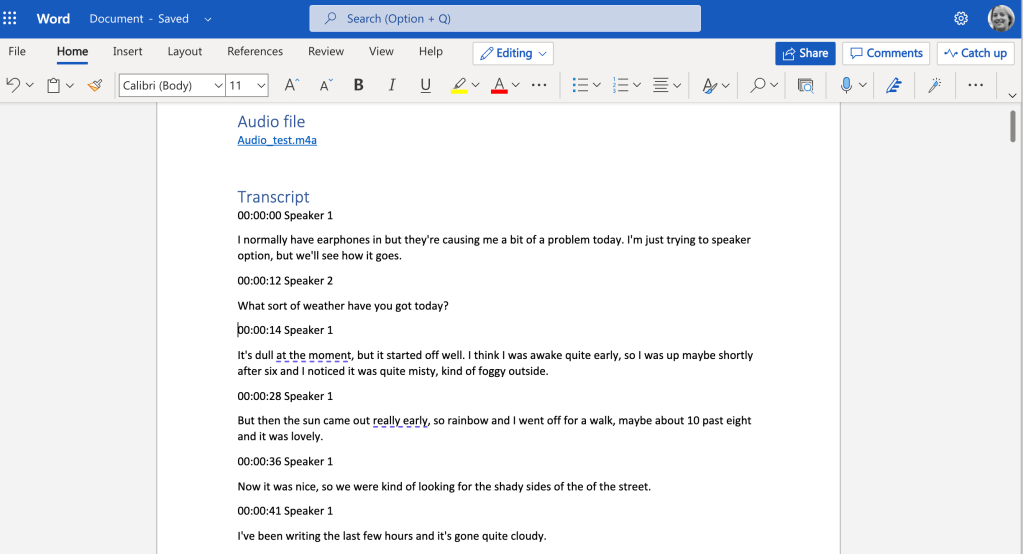
The transcribed file automatically saves to OneDrive. I renamed the file and created a new folder to store it. Job done! There may be easier or better ways to do this, and if so, please do leave a comment. Next challenge is scheduling 10 x 1 hour telephone interviews across the coming months. Originally planned for August, it looks like a few will go into September, necessitating a small adjustment to my Gantt chart!
Until next time, Sandra
 Sandra Flynn
Chatting about the challenges of ‘old school’ telephone interviews with my friend Connie, the ethics of a recording, however temporary, in a non-university cloud, and the monthly time limits of 300 minutes for uploaded recordings.
Well, it turns out that I can use Microsoft Word (on the web using my institution account) to record the interview directly with the interviewee on speaker, the transcript is auto generated and can be edited in the same way as an uploaded file. The audio file (.wav) and transcribed file (.docx of course) are saved automatically to OneDrive. How cool is that, especially the unlimited recordings? And all within the university systems, no third party tools necessary that I had no ethical approval to use – happy day!
Don’t take my word for it (no pun intended!), check it out here – https://www.microsoft.com/en-us/microsoft-365/blog/2020/08/25/microsoft-365-transcription-voice-commands-word/
LikeLiked by 1 person